How to Submit a VA Benefits Claim Form with VONAPP
The Veterans Affairs office offers veterans the ability to submit VA benefits claim forms online with Veterans On Line Application (VONAPP).

Why trust The Military Wallet? We’re a veteran-founded resource that has helped millions make strong financial decisions.
Advertiser Disclosure: The Military Wallet and Three Creeks Media, LLC, its parent and affiliate companies, may receive compensation through advertising placements on The Military Wallet. For any rankings or lists on this site, The Military Wallet may receive compensation from the companies being ranked; however, this compensation does not affect how, where, and in what order products and companies appear in the rankings and lists. If a ranking or list has a company noted to be a “partner,” the indicated company is a corporate affiliate of The Military Wallet. No tables, rankings, or lists are fully comprehensive and do not include all companies or available products.
The Military Wallet and Three Creeks Media have partnered with CardRatings for our coverage of credit card products. The Military Wallet and CardRatings may receive a commission from card issuers. You can read more about our card rating methodology here.
Opinions, reviews, analyses & recommendations are the author’s alone and have not been reviewed, endorsed, or approved by any of these entities. For more information, please see our Advertising Policy.
American Express is an advertiser on The Military Wallet. Terms Apply to American Express benefits and offers.
Submitting a VA Claims Form Online
Once you are logged into your account, you can begin by immediately making an online claim or adjustment to your profile. Make sure you have all applicable information at hand when you start your claim, as the computer will automatically time you out after 15 minutes of non-activity. VONAPP will save your form and you should be able to pick up where you left off. That said, it’s better not to chance fate, and try to fill out your form in one go if possible. You must complete your form within 30 days, otherwise the system automatically deletes it. Example claim: I needed to update the status of my dependents on my VA profile as my wife and I had a daughter two months ago. We had to wait until we received her Social Security Card before we could add her to my profile (the VA tracks dependents by SSN). Once you are logged in to VONAPP, you can choose the type of claim you want to make by using the drop box, as seen in the image below: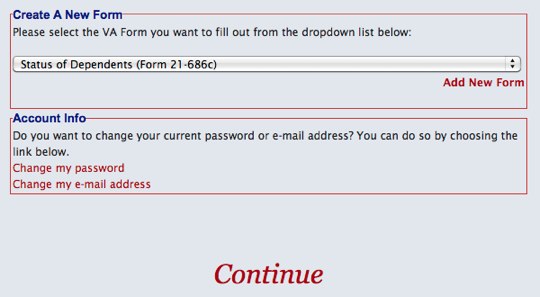
Submit a VA Claims form online with VONAPP
Starting Your Online VA Claim
After several pages of the aforementioned details, you will arrive to the page where you begin your claim. This is where you will enter your personal information such as your name, SSN, and VA File Number (SSN for many people). You will also have to disclose whether or not the claimant is the veteran or if you are making the claim on behalf of a veteran, then input your address and contact information. Once you input this information, you will be required to enter information specific to your claim. As I was updating my dependent status, I had to answer a bunch of questions about my spouse, children and family situation. Again, it is highly recommended that you have all your information in front of you when you start your claim, otherwise it will take you a lot longer to fill out your form as you will spend time hunting for information.Submitting Your VA Benefits Claim
Before submitting your claim via VONAPP, you will first view a pre-submission page which will let you know if the system detects any errors in your submission. The system can only detect errors such as blank fields and similar clerical errors; it can’t predict if your form was filled out 100% correctly, or whether or not your claim will be approved. If there are no errors on your form, you will be able to submit it. You also have the option of suspending or deleting your form. If you choose to suspend your claim, you must complete your form within 30 days or it is automatically purged from the system. If you delete it, the form will be permanently erased from VONAPP – only choose this option if you don’t wish to file electronically and don’t wish to continue filling out your form at a later date.Printing Forms, Uploading Files, a Certifying Your Claim
VONAPP gives veterans the option of printing their forms for their personal records. This is recommended so you can have a copy of the form you sent to the VA. You can also print a blank form to fill out in your spare time or to take with you to the VA or another Veterans Service Organization if you prefer to fill out the form offline (you may find this beneficial if you have a complicated claim, or you may prefer to fill out the form on paper first, then submit it online). After the printing option you have the option to submit forms to substantiate your claim. You can upload up to 5 files with a total size of up to 1MB. Pay attention to file formats, as some file types are not currently accepted. After this, you must certify your submission. Keep in mind that your digital certification is considered the same a your signature, so always make sure you fill out your forms to the best of your knowledge (falsification is subject to possible penalties).Confirmation and Next Steps
After you submit your final certification, you will be taken to a page which state how your application will be processed and which steps will happen next. This information will include the location and contact information of the VA Center where your claim will be processed, along with a confirmation number which you can use to help the VA identify your claim. be sure to print this page for your records; you will need this to follow up with your claim. You will be contacted if the VA needs more information to process your claim. Keep in mind that it is also possible that your original claims office may transfer your claim to another office at some point in the future. If this is the case, the VA will notify you via telephone, e-mail, or the postal service. Once your claim is accepted, you will return to the VONAPP home page where you can start a new claim if you need to.